Magic Click Voice Access And EVA Facial Mouse Pro
Introduction To Voice Access And EVA Facial Mouse Pro
Technology is becoming smarter every day, and accessibility apps are helping millions of users control their smartphones more easily. Two of the most powerful accessibility tools are Voice Access and EVA Facial Mouse Pro. These apps are specially designed for users who want hands-free control of their Android devices. They are useful for disabled users, multitaskers, gamers, content creators, and even normal smartphone users who want a smarter experience.
is a voice control application developed by , while allows users to control their device using facial movements through the front camera. Both applications improve accessibility and make smartphone usage more advanced, comfortable, and futuristic.
What Is Voice Access?
Voice Access is an Android accessibility application that allows users to control their phones completely through voice commands. Instead of touching the screen, users can open apps, scroll pages, type messages, click buttons, and perform many actions simply by speaking.
This app was mainly created for people with physical disabilities, but now many normal users also use it for convenience and productivity.
Main Features Of Voice Access
Hands-Free Smartphone Control
The biggest feature of Voice Access is complete hands-free control. Users can operate their smartphones without touching the display.
For example, you can say:
- Open YouTube.
- Scroll down.
- Go back.
- Open WhatsApp.
- Send message.
- Increase volume.
The app recognizes voice commands quickly and performs actions instantly.
Voice Typing Feature
Voice Access also supports voice typing. Users can write messages, notes, emails, and social media captions using speech.
This feature saves time and improves typing speed. It is very useful for YouTubers, bloggers, and social media creators.
App Navigation Support
The application supports navigation inside apps. Users can move through menus, settings, and buttons by using voice instructions.
The app displays numbers on clickable items, allowing users to select options by speaking numbers.
Accessibility Support
Voice Access is specially helpful for users with disabilities or injuries. People who cannot use their hands properly can control Android devices easily.
This makes smartphones more inclusive and user-friendly.
Offline Support
Some Voice Access features also work offline. Users can perform basic tasks even without internet connectivity.
This improves reliability and convenience.
How To Use Voice Access
Download And Install
Users can install Voice Access from the Google Play Store.
After installation:
- Open the app.
- Enable accessibility permissions.
- Activate microphone access.
- Start Voice Access.
Once enabled, the app starts listening for commands.
Basic Commands
Some popular commands include:
- Open Chrome.
- Scroll up.
- Tap 5.
- Go home.
- Turn Wi-Fi on.
- Open camera.
These commands help users navigate devices faster.
Using Number Labels
Voice Access displays numbers on buttons and menu items. Users simply say the number to click an option.
For example:
- “Tap 7”
- “Select 3”
This feature makes navigation extremely easy.
Advantages Of Voice Access
Improves Productivity
Users can perform multiple tasks quickly without touching the device. This increases productivity and efficiency.
Helpful During Driving
Voice commands allow users to control phones while driving, cooking, or working.
However, users should still follow safety rules while driving.
Useful For Disabled Users
People with mobility issues can use smartphones independently using Voice Access.
This gives users more freedom and accessibility.
Fast Navigation
Voice commands are often faster than manual tapping, especially for experienced users.
Disadvantages Of Voice Access
Needs Clear Voice
The application works best with a clear voice and proper pronunciation.
Noisy environments may reduce accuracy.
Battery Consumption
Continuous microphone usage may consume extra battery power.
Limited Offline Features
Some advanced features still require an internet connection.
What Is EVA Facial Mouse Pro?
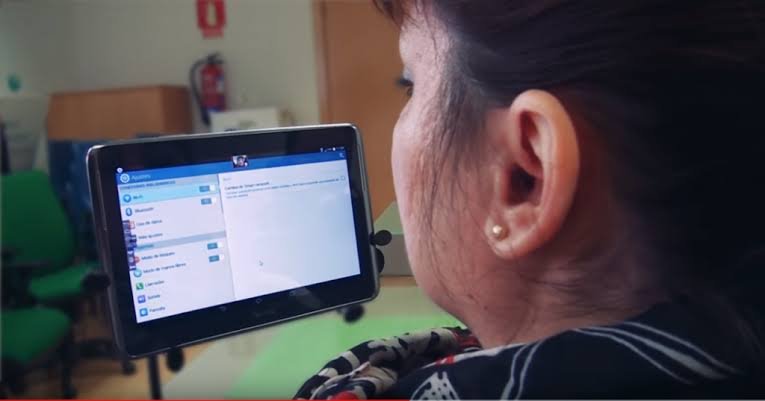
is an advanced facial tracking application that allows users to control smartphones using face movements.
The app uses the front camera to track head movements and facial gestures. Users can move the cursor on screen by moving their head.
This application is especially useful for users with physical disabilities who cannot use touch controls.
Main Features Of EVA Facial Mouse Pro
Face Tracking Technology
The app uses facial recognition and head tracking technology to detect movements accurately.
Users move their heads slightly to control the on-screen cursor.
Cursor Navigation
EVA Facial Mouse Pro displays a cursor on the screen. Users can move the cursor using facial movements.
This provides a complete touch-free experience.
Auto Click Feature
The application supports automatic clicking. When the cursor stays on a button for a few seconds, it automatically clicks.
This feature helps users operate phones without touching the screen.
Customizable Settings
Users can adjust:
- Cursor speed.
- Sensitivity.
- Click timing.
- Tracking accuracy.
These customization options improve user comfort.
Accessibility Support
The app is mainly designed for disabled users who have difficulty using touchscreens.
It improves independence and digital accessibility.
How To Use EVA Facial Mouse Pro
Install The Application
Download EVA Facial Mouse Pro from the Play Store.
After installation:
- Open the app.
- Grant accessibility permissions.
- Allow camera access.
- Start facial tracking.
The app will begin detecting head movements.
Position Your Face Properly
Users should sit in a well-lit environment for better tracking accuracy.
The front camera should clearly detect facial movements.
Move Cursor Using Head
Move your head slowly to move the cursor on screen.
The cursor follows facial movements accurately.
Use Auto Click
Hover the cursor over buttons to activate automatic clicking.
This removes the need for physical touching.
Advantages Of EVA Facial Mouse Pro
Complete Touch-Free Control
Users can operate devices without using fingers or hands.
Helpful For Disabled Users
The app improves smartphone accessibility for physically challenged individuals.
Advanced Technology
Facial tracking technology makes smartphone usage futuristic and smart.
Customizable Experience
Users can personalize controls according to their comfort.
Disadvantages Of EVA Facial Mouse Pro
Requires Front Camera
The app depends completely on the smartphone camera.
Poor camera quality may affect performance.
Battery Usage
Continuous camera usage can drain battery faster.
Needs Proper Lighting
Low light conditions may reduce tracking accuracy.
Voice Access Vs EVA Facial Mouse Pro
Control Method
Voice Access uses speech commands, while EVA Facial Mouse Pro uses facial movements.
Accessibility
Both applications are designed for accessibility and hands-free smartphone control.
Ease Of Use
Voice Access is easier for users comfortable with speaking commands.
EVA Facial Mouse Pro is useful for users who cannot speak clearly but can move their heads.
Technology Used
Voice Access uses speech recognition technology.
EVA Facial Mouse Pro uses facial tracking and camera detection.
Best Uses Of Voice Access
For Content Creators
YouTubers and creators can use voice commands while editing videos or recording content.
For Multitasking
Users can control devices while cooking, exercising, or working.
For Accessibility
People with physical limitations can use smartphones independently.
Best Uses Of EVA Facial Mouse Pro
For Disabled Users
The app is highly useful for users with limited hand movement.
For Futuristic Smartphone Experience
Users can experience advanced AI-based smartphone control.
For Touch-Free Navigation
The app is excellent for hands-free navigation.
Privacy And Security
Microphone Permissions
Voice Access requires microphone access to recognize commands.
Users should download the official application for security.
Camera Permissions
EVA Facial Mouse Pro requires front camera access for facial tracking.
Always install apps from trusted sources.
Tips To Improve Voice Access Performance
Speak Clearly
Use clear pronunciation for better recognition.
Reduce Background Noise
Quiet environments improve voice detection accuracy.
Use Updated Android Version
Updated Android systems provide better compatibility.
Tips To Improve EVA Facial Mouse Pro Performance
Use Proper Lighting
Bright environments improve face tracking accuracy.
Hold Phone Steady
Stable phone positioning helps smoother cursor control.
Adjust Sensitivity Settings
Customize cursor sensitivity according to comfort.
Why Accessibility Apps Are Important
Accessibility applications help make technology available for everyone. These apps improve independence, communication, and digital freedom for disabled users.
Voice Access and EVA Facial Mouse Pro are powerful examples of how technology can improve lives.
Future Of Hands-Free Smartphone Technology
The future of accessibility technology is becoming more advanced with artificial intelligence and smart sensors.
Future updates may include:
- Better voice recognition.
- Faster facial tracking.
- Eye tracking support.
- Gesture controls.
- AI-powered automation.
Hands-free smartphone technology will continue improving user convenience.
How These Apps Help Daily Life
During Work
Users can control smartphones while working on other tasks.
During Cooking
Hands-free controls help users avoid touching screens with dirty hands.
During Exercise
Users can control music and calls without stopping workouts.
For Elderly Users
Older users with mobility problems can use smartphones more comfortably.
Compatibility Requirements
Voice Access Requirements
- Android smartphone.
- Microphone support.
- Accessibility permissions.
- Internet for some advanced features.
EVA Facial Mouse Pro Requirements
- Android smartphone.
- Front camera.
- Accessibility permissions.
- Good lighting conditions.
Common Problems And Solutions
Voice Access Not Working
Possible solutions:
- Restart the app.
- Check microphone permissions.
- Use internet connection.
- Update the application.
EVA Facial Mouse Cursor Lagging
Possible solutions:
- Improve lighting.
- Clean front camera.
- Reduce background movement.
- Restart the app.
Are These Apps Safe?
Both applications are generally safe when downloaded from official sources like the Google Play Store.
Users should avoid modified APK versions from unknown websites because they may contain malware or security risks.
Why These Apps Are Becoming Popular
Hands-free technology is becoming very popular because users want convenience, accessibility, and smart control.
Voice Access and EVA Facial Mouse Pro provide futuristic experiences that attract both disabled and normal users.
Final Words
and are powerful accessibility applications that improve smartphone usability through hands-free control. Voice Access allows users to control devices using speech commands, while EVA Facial Mouse Pro enables navigation through facial movements and head tracking.
These apps are extremely useful for disabled users, multitaskers, elderly people, and technology enthusiasts. They improve productivity, accessibility, and convenience in daily life.
As artificial intelligence and accessibility technologies continue evolving, hands-free smartphone control will become even smarter and more advanced in the future.