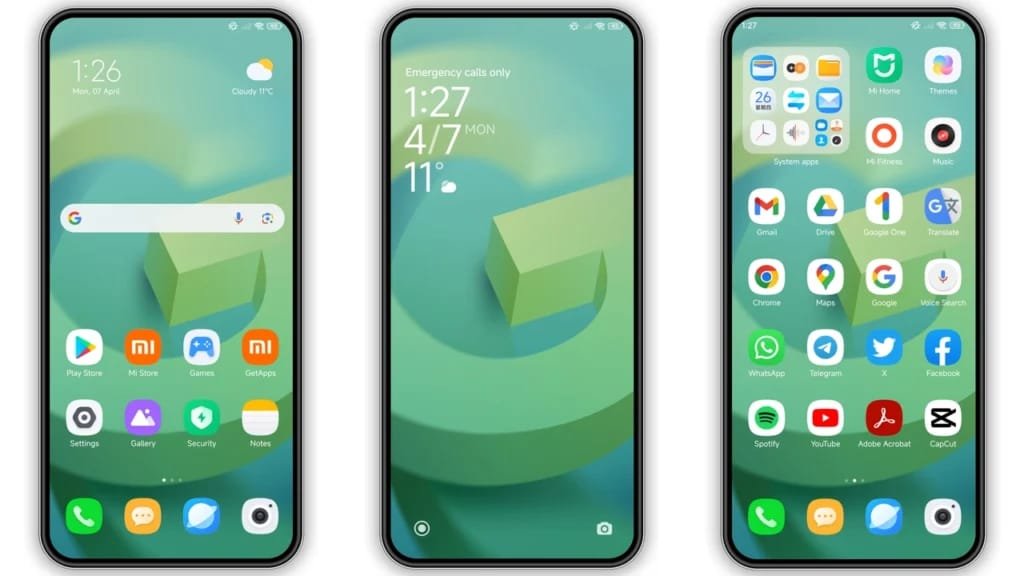
One of the biggest reasons people love Android phones is customization. Unlike many other mobile operating systems, Android gives users the freedom to completely change how their devices look and function. From custom themes and launchers to widgets and icon packs, Android customization allows users to create a smartphone experience that feels unique and personal.
In 2026, Android customization has become more powerful than ever. With advanced AI tools, dynamic themes, and flexible interfaces, users can transform even budget smartphones into stylish, high-performance devices.
Whether you want a clean professional setup, a gaming-inspired design, or a futuristic interface, Android customization makes it possible.
What Is Android Customize?
Android customize refers to modifying the appearance, layout, and functionality of an Android smartphone. Users can personalize almost every part of the device, including:
- Home screen layouts
- App icons
- Wallpapers
- Themes
- Widgets
- Notifications
- Fonts
- Animations
This flexibility is one of Android’s biggest advantages over competing mobile systems.
Why Android Customization Is So Popular
Android users enjoy customization because it provides freedom and creativity.
Personalized User Experience
Everyone uses smartphones differently. Android customization allows users to design a setup that matches their lifestyle and preferences.
Improved Productivity
Custom widgets, shortcuts, and app organization can help users work faster and stay organized.
Better Aesthetics
Many people customize Android phones simply to make them look more modern, minimal, or visually impressive.
Best Ways to Customize Android in 2026
There are countless ways to personalize an Android phone. Here are the most effective methods.
Use Custom Launchers
Launchers completely change the look and feel of your Android home screen.
Popular launchers include:
- Nova Launcher
- Microsoft Launcher
- Niagara Launcher
Benefits of Launchers
- Custom gestures
- Faster navigation
- Unique layouts
- Advanced icon customization
Launchers are one of the easiest ways to redesign your Android experience.
Install Icon Packs
Icon packs change the appearance of app icons for a more stylish and consistent look.
Popular styles include:
- Minimalist icons
- Neon gaming icons
- 3D icons
- Dark mode icon packs
Combining icon packs with launchers creates a fully customized interface.
Add Widgets to Your Home Screen
Widgets provide useful information without opening apps.
Examples include:
- Weather updates
- Calendar reminders
- Battery monitors
- Music controls
- Clock widgets
Apps like KWGT allow advanced widget customization.
Apply Dynamic Wallpapers and Themes
Modern Android devices support dynamic wallpapers and adaptive color themes.
Popular Customization Options
- Live wallpapers
- AMOLED dark themes
- Anime backgrounds
- Gaming wallpapers
- AI-generated themes
Dynamic themes can automatically change colors based on wallpapers for a cleaner visual experience.
Customize Android for Gaming
Gamers often personalize their phones for performance and style.
Gaming Setup Ideas
- RGB-inspired wallpapers
- Gaming icon packs
- Performance widgets
- Game booster apps
- Minimal distraction layouts
Many gaming phones now include built-in customization modes specifically for mobile gamers.
Best Android Customization Apps
Here are some of the best apps for Android customization in 2026.
1. Nova Launcher
Nova Launcher remains one of the most powerful Android launchers available.
Features
- Gesture controls
- Backup and restore layouts
- Advanced app drawer customization
- Smooth animations
2. Zedge
Zedge is popular for wallpapers, notification sounds, and ringtones.
3. KWGT
KWGT helps users create fully personalized widgets.
4. Niagara Launcher
Niagara Launcher is ideal for users who prefer a clean and simple interface.
Advanced Android Customization
Experienced users often explore advanced customization options.
Rooting Android Devices
Rooting provides deeper control over system settings and performance.
However, rooting can:
- Void warranties
- Reduce security
- Cause system instability
It is recommended only for advanced users.
Custom ROMs
Custom ROMs replace the default Android operating system with modified versions that offer additional features and performance improvements.
Popular ROMs include:
- LineageOS
- Pixel Experience
- Evolution X
Tips for Safe Android Customization
Download Apps From Trusted Sources
Only install customization apps from reliable platforms like:
Avoid Excessive Widgets
Too many live widgets can reduce battery life and slow performance.
Use Dark Mode
Dark themes improve battery efficiency on AMOLED screens.
Backup Your Setup
Some launchers allow users to save custom layouts and restore them later.
The Future of Android Customization
Android customization is expected to become even smarter with:
- AI-powered themes
- Adaptive user interfaces
- Voice controlled layouts
- Dynamic app organization
Future Android systems may automatically personalize devices based on user habits and preferences.
Conclusion
Android customization gives users complete control over how their smartphones look and function. Whether you prefer a minimalist design, gaming-inspired setup, or productivity-focused layout, Android offers endless possibilities for personalization.
Download
Download
Download