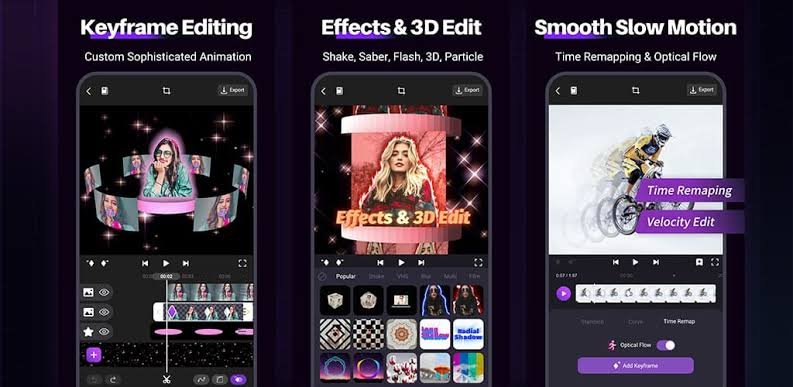
In today’s fast paced digital world, simple videos are no longer enough to capture attention. Whether you’re a YouTuber, marketer, or filmmaker, using a 3D video editor can take your content to the next level. From cinematic animations to realistic effects, 3D editing tools open up endless creative possibilities.
But what exactly is a 3D video editor, and how can you use it effectively? Let’s break it down in a simple and practical way.
What is a 3D Video Editor?
A 3D video editor is a software tool that allows users to create, edit, and manipulate videos with three-dimensional elements. Unlike traditional video editing, 3D editing adds depth, lighting, textures, and motion to create realistic or animated visuals.
These tools are widely used in:
- Film production
- YouTube content creation
- Game design
- Advertising and marketing
Popular examples include tools like Blender, Adobe After Effects, and Cinema 4D.
Key Features of a 3D Video Editor
1. 3D Modeling and Animation
You can create objects, characters, and environments from scratch. These can be animated to move, rotate, and interact.
2. Visual Effects (VFX)
Add explosions, smoke, lighting effects, and more to make your videos look professional.
3. Realistic Lighting and Shadows
Advanced lighting tools help create lifelike scenes by controlling shadows, reflections, and highlights.
4. Motion Tracking
Attach 3D elements to real world footage, making it appear as if they exist in the scene.
5. Rendering Engine
This converts your 3D project into a final video with high quality output.
Best 3D Video Editor Tools in 2026
1. Blender (Free & Powerful)
Blender is one of the most popular free tools available. It offers everything from modeling to animation and rendering.
Best for: Beginners and professionals on a budget
Pro Tip: Use built-in templates to speed up your workflow.
2. Adobe After Effects (Industry Standard)
Adobe After Effects is widely used for motion graphics and visual effects.
Best for: Motion graphics and YouTube content
Pro Tip: Combine with Premiere Pro for full video editing.
3. Cinema 4D (Professional Level)
Cinema 4D is known for its ease of use and powerful animation tools.
Best for: Advanced users and designers
Pro Tip: Great for creating product ads and cinematic intros.
How to Choose the Right 3D Video Editor
Choosing the best 3D video editor depends on your needs and experience level.
Consider These Factors:
- Skill Level: Beginners should start with simple tools like Blender
- Budget: Free vs paid software
- Purpose: YouTube videos, films, or ads
- System Requirements: High-end tools need powerful PCs
Tips to Create High-Quality 3D Videos
Start Simple
Don’t jump into complex projects. Begin with basic animations and gradually improve.
Learn Lighting Techniques
Lighting can make or break your 3D video. Experiment with shadows and reflections.
Use Templates and Assets
Save time by using pre-made models and templates.
Focus on Storytelling
Even the best visuals need a strong story to engage viewers.
Optimize Rendering Settings
High-quality rendering is important, but balance it with speed to avoid long processing times.
Why 3D Video Editing is Important in 2026
3D video content is becoming increasingly popular due to:
- Higher engagement rates
- Better storytelling capabilities
- Professional and cinematic quality
Businesses use 3D videos for marketing, while creators use them to stand out on platforms like YouTube and TikTok.
Conclusion
A 3D video editor is no longer just a tool for professionals it’s becoming essential for anyone who wants to create eye-catching, high quality content. Whether you choose Blender for its free features or Adobe After Effects for its advanced capabilities, the key is to start learning and experimenting.
Download